What Is a Run of Show and Why Does Your Virtual Event Need One?
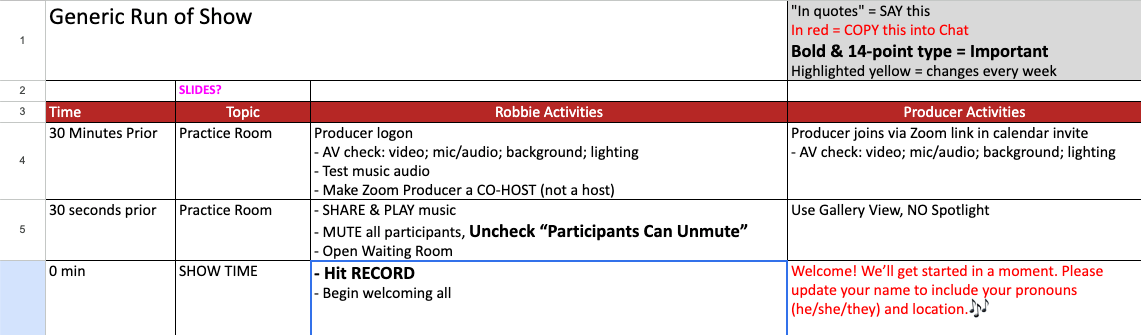
There’s a moment right before every event starts.
Cameras are coming on. Chat is warming up. The host is taking a breath.
And behind the scenes, one document determines whether the next 60 minutes feel calm and intentional… or rushed and reactive.
That document is the run of show.
What a Run of Show Actually Does
Most people think of a run of show as a schedule.
It’s not.
A true run of show is a decision-making tool in real time.
It answers, instantly:
- What’s happening now
- What’s happening next
- Who is responsible
- What to do if something shifts
Without it, your event relies on memory and improvisation.
With it, your event runs on clarity.
Why It Matters More on Zoom (and Hybrid)
In in-person events, you can recover quickly:
- A speaker reads the room
- A producer gives a hand signal
- Energy fills gaps
On Zoom, none of that exists.
Instead, you’re dealing with:
- Delayed audio cues
- Screen sharing transitions
- Breakout room timing
- Chat and Q&A management
- Multiple roles (host, co-host, speaker, tech)
The run of show becomes your shared operating system.
What Most People Miss
The biggest mistake I see is this:
The run of show is written for content… not for execution.
It says:
10:10 – Speaker begins
But it doesn’t say:
- Who introduces them
- Whether slides are already loaded
- What happens if they’re not ready
- What the tech host is doing at that moment
That’s where events start to feel clunky.
What to Include (That Most Don’t)
Here’s what elevates a run of show from basic to professional:
1. Time + Duration
Not just start times, but how long each segment should take.
2. Roles and Ownership
Every line should answer: Who is doing this?
- Host
- Producer
- Speaker
- Chat moderator
3. Technical Actions
This is where most run of shows fall apart.
Include:
- Mute/unmute cues
- Screen share transitions
- Breakout room opens/closes
- Poll launches
- Recording start/stop
4. Verbatim Language (When Stakes Are High)
For key moments, don’t leave it to chance.
Write it out:
- Opening welcome
- Transition lines
- Sponsor acknowledgments
- Closing CTA
5. Contingencies
Because something will shift.
Plan for:
- Speaker late
- Tech issue
- Segment running long
A simple note like:
“If running behind, skip audience question and move to closing”
…can save the entire event.
The Hidden Benefit: Confidence
When your run of show is clear:
- Speakers feel supported
- Hosts stay present
- Tech becomes invisible
- The audience feels momentum
This is the difference between:
“We got through it”
…and
“That felt seamless”
A Strategic Shift
If you take one thing from this:
Stop thinking of your run of show as a document.
Start thinking of it as a live performance guide.
Because that’s what your audience experiences.
If You Want to Go Deeper
If you’re running high-stakes meetings, webinars, or hybrid events and want a second set of eyes on your run of show, I offer:
- Run of show reviews
- Zoom event strategy sessions
- Full event production support
The goal is simple:
You focus on the message. Everything else supports it.
Feel free to share this newsletter with a friend struggling with virtual events.
My company is Calm, Clear, Media. I produce purpose-driven virtual events for nonprofits and member organizations. I don’t just manage Zoom calls; I create experiences that reflect your mission and engage your audience. My job is to make sure everything runs smoothly so my clients can focus on impact.
#VirtualEvents #CoHost #Engagement #TechSupport #Professionalism #Teamwork